On-Page SEO for beginners is the process of optimizing individual web pages to improve their visibility in search engines and provide a better experience for visitors.
For beginners, SEO can sometimes feel complicated because it includes many different activities. However, you can start with the basics and gradually improve your website. If you’re completely new to digital marketing, you can first read my complete digital marketing guide for beginners
In this guide, you will learn what on-page SEO is, why it matters, and how to optimize important elements such as titles, headings, URLs, content, images, internal links, and meta descriptions.
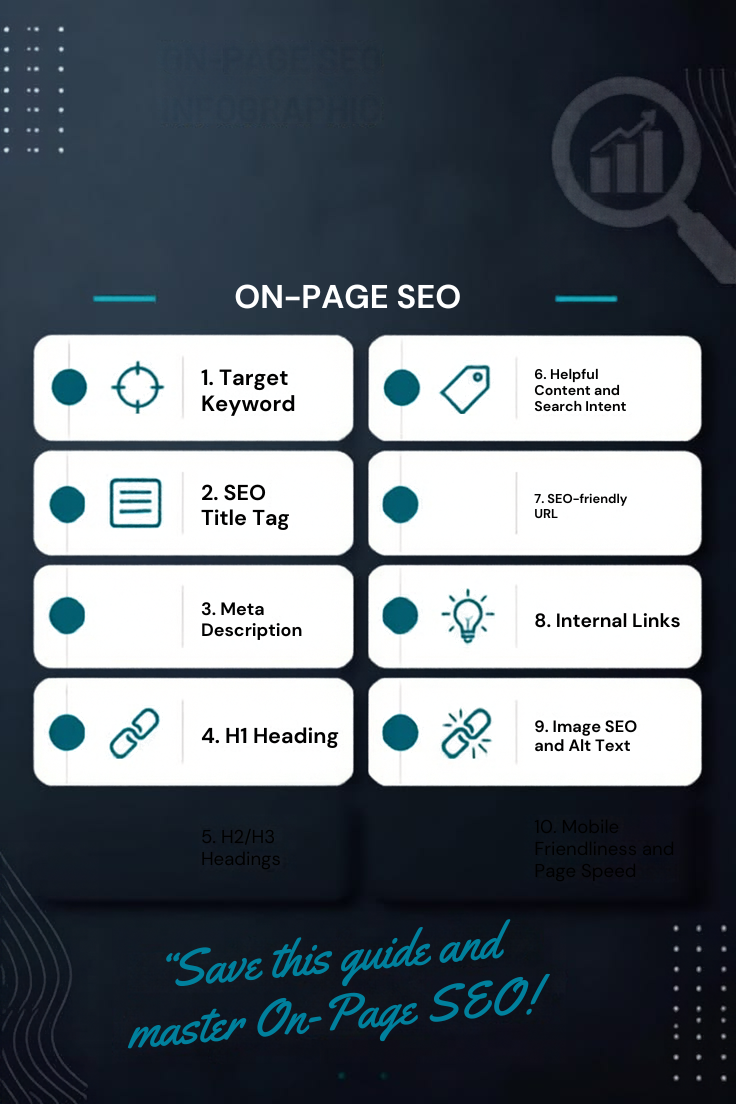
What Is On-Page SEO?
On-page SEO is the process of optimizing the content and elements of individual web pages to make them easier for search engines and users to understand.
It includes elements such as:
- Page titles
- Headings
- Website content
- Keywords
- URLs
- Meta descriptions
- Images and alt text
- Internal links
- Content structure
- User experience
The goal is not simply to add more keywords to a page. Instead, the page should clearly satisfy the user’s search intent and provide useful information.
Why Is On-Page SEO Important?
Imagine that you have written a high-quality article, but search engines cannot easily understand what the page is about.
Optimizing the page helps provide clearer signals about its topic and structure.
Good on-page SEO can help you:
- Make your content easier to understand
- Improve the user experience
- Help search engines interpret your page
- Organize your website better
- Improve the visibility of relevant content
- Make your pages easier to navigate
However, SEO optimization alone does not guarantee a particular Google ranking. Google considers many signals when determining search results. Its guidance also emphasizes creating useful content and providing a good overall page experience.
1. Choose the Right Keyword
Before writing an article, identify the main topic you want the page to cover.
For example, if your article is about improving a website’s individual pages, your primary keyword could be:
On-Page SEO
Related phrases might include:
- on-page optimization
- SEO optimization
- website SEO
- SEO techniques
- search engine optimization
Don’t try to use every related keyword repeatedly. Use words and phrases naturally where they help explain the topic.
Example
Instead of:
On-page SEO is important because on-page SEO improves on-page SEO and on-page SEO helps with SEO.
Write:
On-page SEO helps you organize your website content and make individual pages easier for users and search engines to understand.
The second version sounds natural and provides more value.
2. Optimize Your SEO Title
The SEO title is one of the first things users may see in search results.
A good title should clearly communicate what the page is about.
Example:
Complete On-Page SEO Guide for Beginners
This title contains the main topic while also telling readers that the article is designed for beginners.
Avoid creating titles that are misleading or filled with unnecessary keywords.
3. Write a Useful Meta Description
A meta description provides a short summary of a webpage.
For example:
Learn on-page SEO from the basics, including keywords, titles, headings, URLs, images, internal links, and content optimization.
A useful description can help users understand what they will find on the page.
Remember that search engines may sometimes generate a different search-result snippet instead of using the exact meta description you provide.
4. Use Proper Headings
Headings make your content easier to scan.
Your article can use a simple structure such as:
H1: Complete On-Page SEO Guide for Beginners
H2: What Is On-Page SEO?
H2: Why Is On-Page SEO Important?
H2: How to Optimize Your Website
H3: Optimize Your SEO Title
H3: Write a Useful Meta Description
H3: Optimize Your Images
This structure helps readers quickly find the information they need.
Use one clear main H1 for the article and use H2 and H3 headings to organize sections logically.
5. Create Helpful and Original Content
Content is one of the most important parts of a website.
Instead of writing an article only to include keywords, focus on answering the questions your audience actually has.
For example, if your audience is beginners, explain technical terms in simple language and provide practical examples.
You can also improve your content by adding:
- Examples
- Step-by-step explanations
- Screenshots
- Infographics
- Tables
- Relevant statistics
- Useful external resources
Google’s documentation emphasizes following Search Essentials and avoiding spam practices such as keyword stuffing.
6. Optimize Your URL
A clean URL helps users understand what a page is about.
Poor example:
nikhilkalra.com/page123?id=457
Better example:
nikhilkalra.com/on-page-seo-guide-for-beginners/
The second URL clearly communicates the topic of the page.
Keep URLs simple, readable, and relevant to the page.
7. Optimize Your Images
Images can make your blog more engaging, but they should also be properly optimized.
For each important image, consider:
File name
Instead of:
IMG12345.jpg
Use:
on-page-seo-guide.jpg
Alt text
Instead of:
image
Use:
on-page SEO optimization checklist
Alt text should describe the image accurately. Don’t use alt text simply as a place to insert keywords.
You should also compress large images so they don’t unnecessarily slow down your website.
8. Use Internal Links
Internal linking means linking from one page on your website to another page on the same website.
For your nikhilkalra.com website, this is particularly useful because you are building multiple digital-marketing articles.
For example, in this article you can link to your first article:
Anchor text:complete digital marketing guide for beginners
Then link it to:
You can place the link naturally in a sentence such as:
If you’re completely new to digital marketing, you can first read my complete digital marketing guide for beginners before learning advanced SEO concepts.
This creates a logical connection between your two blogs.
9. Add Relevant External Links
External links point from your website to another website.
When you discuss SEO fundamentals, you can reference reliable sources such as Google Search Central.
For example:
For more information about SEO fundamentals, you can refer to Google’s official SEO Starter Guide.
This provides readers with a trustworthy reference. Google Search Central itself provides the SEO Starter Guide and Search Console resources.
10. Improve Your Website’s Page Experience
SEO is not only about keywords and content.
Your website should also provide a good experience for visitors.
Important areas include:
- Mobile usability
- Page loading performance
- Secure HTTPS connection
- Easy navigation
- Readable content
- Clear page structure
- Avoiding intrusive elements
Google’s current documentation explains that page experience includes areas such as Core Web Vitals, mobile display, HTTPS, and avoiding intrusive interstitials.
11. Avoid Keyword Stuffing
One of the biggest mistakes beginners make is repeating the same keyword again and again.
For example:
On-page SEO helps SEO. Good on-page SEO improves SEO. On-page SEO is important for SEO because SEO helps your website with SEO.
This looks unnatural and provides little value.
Instead, use variations naturally:
Optimizing individual pages can make your content easier to understand. Use your primary topic naturally while also covering related concepts that help readers understand the subject.
Google specifically identifies excessive and unnatural repetition of keywords as keyword stuffing.
12. Monitor Your SEO Performance
After publishing your article, don’t simply forget about it.
Use tools such as Google Search Console to monitor how your pages perform in Google Search.
You can observe information such as:
- Search queries
- Impressions
- Clicks
- Click-through rate
- Average position
- Indexed pages
This data can help you identify opportunities to improve your content.
Simple On-Page SEO Checklist
Before publishing a blog, check the following:
| SEO Element | Check |
|---|---|
| Primary keyword selected | ✅ |
| SEO title optimized | ✅ |
| Meta description written | ✅ |
| One clear H1 | ✅ |
| H2/H3 headings used | ✅ |
| Keyword used naturally | ✅ |
| Clean URL | ✅ |
| Images optimized | ✅ |
| Descriptive alt text | ✅ |
| Internal links added | ✅ |
| Relevant external link added | ✅ |
| Content answers search intent | ✅ |
| Mobile experience checked | ✅ |
| Page speed checked | ✅ |
Frequently Asked Questions
What is on-page SEO?
On-page SEO is the process of optimizing individual webpages, including their content, titles, headings, URLs, images, internal links, and other page elements.
Is keyword density important for SEO?
There is no fixed keyword-density percentage that guarantees better rankings. Keywords should be used naturally and in places where they help users understand the topic. Excessive repetition can become keyword stuffing.
How many keywords should I use in a blog?
There is no universal number. Start with one primary topic and naturally cover relevant subtopics and related phrases rather than trying to reach a specific keyword count.
What is the difference between on-page and off-page SEO?
On-page SEO focuses on elements you can optimize on your own website, such as content, headings, titles, URLs, images, and internal links. Off-page SEO generally involves activities and signals outside your website, such as earning relevant backlinks.
Are internal links important?
Yes. Internal links help users navigate between related pages and help establish connections between content across your website.
Should every image have alt text?
Images that convey useful information should generally have descriptive alternative text. Decorative images can be handled differently depending on their purpose.
Does good SEO guarantee a first-page ranking?
No. SEO can improve a website’s accessibility, relevance, and overall search visibility, but there is no guaranteed position in Google Search. Google evaluates many factors when generating search results.
Conclusion
On-page SEO is an important foundation for building a search-friendly website. By creating useful content, using clear headings, optimizing titles and URLs, adding descriptive image alt text, connecting related pages with internal links, and maintaining a good user experience, you can create stronger webpages.
For beginners, the most important thing is not to focus on a particular keyword percentage. Instead, focus on creating a page that clearly answers the user’s question and is easy to understand and navigate.
As you continue learning SEO, combine on-page optimization with technical SEO, content marketing, analytics, and ethical link-building practices to develop a complete SEO strategy.